Whirlpool is a registered trademark of Whirlpool USA
Add detergent as indicated on the front page and as
described in the chapter “Detergent and Additives”
in the Instructions for Use.
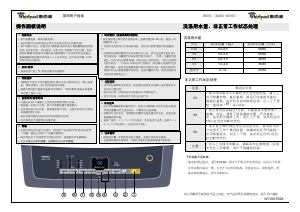
1. Turn the
programme selector
to the desired
programme.
2. The indicator of the predefined
spin speed
lights up; in case you want to set another spin
speed, press the “Variable spin” button.
Press the button(s) of any required option(s) - the
respective indicator lights up.
When the combination of programme and
additional option(s) is not possible,
the indicators switch off automatically. Unsuitable
combinations of options are deselected automatically.
“Prewash” button
• Only for heavily soiled loads (e.g. sand, granular dirt).
Increases the cycle time by approx. 15 minutes.
• Do not use liquid detergent for the main wash
when activating the prewash option.
“Rapid wash” button
• Allows you reduce the wash times of the
“Cotton” and “Synthetics” programmes; with
this option selected the machine does one less
rinse and disables the prewash function.
“Intensive rinse” button
• More water is added and the rinse cycle is
prolonged.
• This option is particularly suitable for areas with
very soft water, washing baby linen, and helps
people with allergies.
“Rinse hold” button
• The laundry remains in the last rinse water
without the final spin cycle, to avoid creasing and
prevent colours from changing.
• This option is particularly recommended for the
“Synthetics”, “Dailywash” or “Delicates”
programmes.
• It is particularly useful if you want to postpone
spinning to a later time, or if you want to drain only.
• If you select “Rinse hold”, do not leave the
laundry to soak for too long.
Note:
The programme stops to “Rinse hold” at
the time the “Rinse Hold” light in the programme
sequence indicator is on. The indicator next to
the
“Start”
button flashes.
To terminate the “Rinse hold” option:
• Press the
“Start”
button; the programme will
terminate automatically with the final spin cycle
for the preset wash programme.
“Variable spin” button
• Every programme has a predefined maximum
spin speed.
• Press the button to set another spin speed.
• If spin speed “00” is selected, the final spin is
cancelled but intermediate spin peaks remain
during rinse. The water is drained out only.
Press the button to select the drying time, in
automatic mode (at end of wash cycle) or in manual
mode, selecting the “Drying” programme (with
hand-washed laundry). In the latter case it is
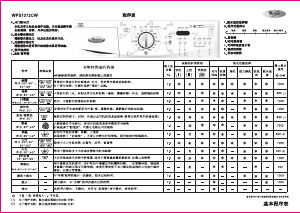
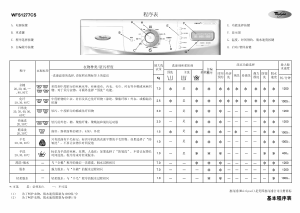
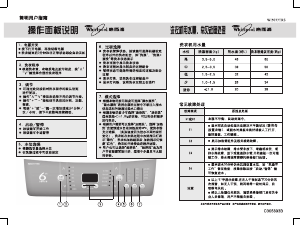
CONSUMPTION DATA
Programme
Temperature
(°C)
Load
(kg)
Water
(l)
Energy
(kWh)
Approx. programme duration
(hours : minutes)
*
White Cotton / Antibacterial 90 6.0 60** 1.70 2:09
Cotton 75 6.0 60 1.33 2:05
Cotton with “Eco”*** 60 6.0 49 0.94 2:07
Cotton 40 6.0 57 0.69 1:51
Synthetics 60 3.0 44** 0.88 1:51
Synthetics 40 3.0 44 0.43 1:39
Dailywash 40 4.0 40 0.39 1:28
Quickwash 35 3.0 37 0.27 0:41
Delicates 30 3.0 50 0.22 0:53
Wool 40 1.5 50 0.39 0:50
Consumption values were measured in normalized conditions in compliance with standard IEC/EN 60 456. In domestic use, consumption data
may vary with respect to the values in the table in relation to the water supply pressure and temperature, the load and the typ
e of wash.
*
The time indicated on the display (if present) can deviate from the values in the table, because it takes into account the household
conditions applicable at that time.
**
To reduce the water temperature, some cold water is added at the end of the main wash cycle, before the pump drains the water o
ut.
***
Reference programme for energy label.
ADD DETERGENTS, CLOSE THE DOOR
AND SELECT THE PROGRAMME
SELECT ANY DESIRED OPTION
DRYING TIME
necessary to spin at a speed of at least 800 rpm. The
set time is shown on the display and varies from “00”
to “180” minutes. Drying is not carried out with set
time “00”.
The “Start Delay” option allows you to programme
machine activation at a later stage, for example at night
when electricity is cheaper. Do not use liquid
detergent when activating the “Start delay”.
• Select the programme and options.
• Press the “Start Delay” button to select
programme start a delay time of 1 to 16 hours;
• Press the
“Start”
button.
The indicator next to the
“Start delay”
button
lights up, whereas the selection made is shown
on the display.
Its flashing indicates the countdown of the
remaining time.
• At the end of the delay time the machine starts
the set programme. The icon indicating the wash
cycle step being carried out at that moment is
displayed.
• After pressing the
“Start”
, the number of hours
preselected can be reduced by pressing and
holding the “Start Delay” button.
To cancel the “Start Delay”:
Press the
“Start delay”
button until the time
indicated on the display is “00”; the selected
programme will then start.
Open the tap and press the
“Start”
. The indicator
next to the
“Start”
button lights up.
At the end of a programme, the message “End”
appears on the display, indicating that the door can
be opened. As long as a wash programme is running,
the door remains locked and must not be forced
open. In case you have an urgent need to open it
during a running programme, refer to “Cancel
(Reset) a running programme before the end”.
E02-E03 “Service”
The display of this “Service” code can be due to a
faulty electrical component. Refer to the
“Troubleshooting guide” in the Instructions for Use;
If the fault persists, contact the After-Sales Service.
E01 “Pump cleaning”
The water is not discharged. Check if the drain hose
is bent or if the filter requires cleaning; in the latter
case, refer to the Instructions for Use (“Removing
the filter”).
E00 “Water tap closed”
The washing machine water feed is insufficient or
lacking. Open the tap; Turn the programme
selector to “Off/O” and reset the programme. If the
fault remains displayed, consult the
“Troubleshooting guide” in the Instructions for Use.
E04 “Door open”
The display of this code could be due to the door not
being properly closed. Try closing it again. Turn the
programme selector to “Off/O” and reset the
programme. If the fault remains displayed, consult the
“Troubleshooting guide” in the Instructions for Use.
• At the end of the wash cycle, the message
“END” will appear on the display, indicating
that the door is unlocked.
1. Turn the programme selector to the “Off/O”
position.
2. Close the water tap.
3. Open the door and remove the washing.
4. Leave the door ajar to allow the drum to dry.
1. Turn the programme selector to “Off/O”.
2. Select the new programme, any options and
another spin speed if you want.
3. Press the
“Start”
button again. The new
programme resumes the wash programme
from where the previous one was interrupted.
Do not add detergent for this programme.
• Reset by turning the programme selector to
“Off/O” and select the “Drain Spin”
programme to remove the water remaining in
the bowl before the door can be opened.
START DELAY
PROGRAMME START
“DOOR OPEN” INDICATOR
DISPLAY ALPHANUMERIC INDICATIONS
END OF WASH CYCLE
CHANGING PROGRAMME AND/OR
OPTIONS AFTER PROGRAMME START
CANCEL (RESET) A RUNNING
PROGRAMME BEFORE THE END


加入有关该产品的对话
您可以在这里分享您对 惠而浦AWU610洗衣机 的看法。 如果您有疑问,请先仔细阅读手册。 可以使用我们的联系表索取手册。