
说明书 Timex TW5M32800 Marathon 手表
需要您的 Timex TW5M32800 Marathon 手表 手册吗? 您可以在下面免费查看和下载中文版 PDF 手册。 该产品目前有 6 个常见问题,1 条评论,有 0 票。 如果这不是您想要的手册,请联系我们。
您的产品是否出现故障而说明书没能提供解决方案?请前往 Repair Café 以获得免费维修服务。
说明书
Loading…
1
ENGLISH 03Q-096000
EXTENDED WARRANTY
Available in U.S. only. Extend your warranty for an additional 4 years
from date of purchase for $5. You can pay with AMEX, Discover, Visa or
MasterCard by calling 1 800-448-4639 during normal business hours.
Payment must be made within 30 days of purchase. Name, address,
telephone number, purchase date, and 5-digit model number required. You
can also mail a check for $5 to: Timex Extended Warranty, P.O. Box 1676,
Dept. EF, Little Rock, AR 72203.
Please read instructions carefully to understand how to operate your Timex
®
watch. Your model may not have all of the features described in this
booklet.
FEATURES AND BASIC OPERATION
1. Date with MM-DD (month/day) format
2. Daily Alarm with Snooze feature
3. Hourly Chime
4. 24-Hour Stopwatch with Split time
5. INDIGLO
®
night-light
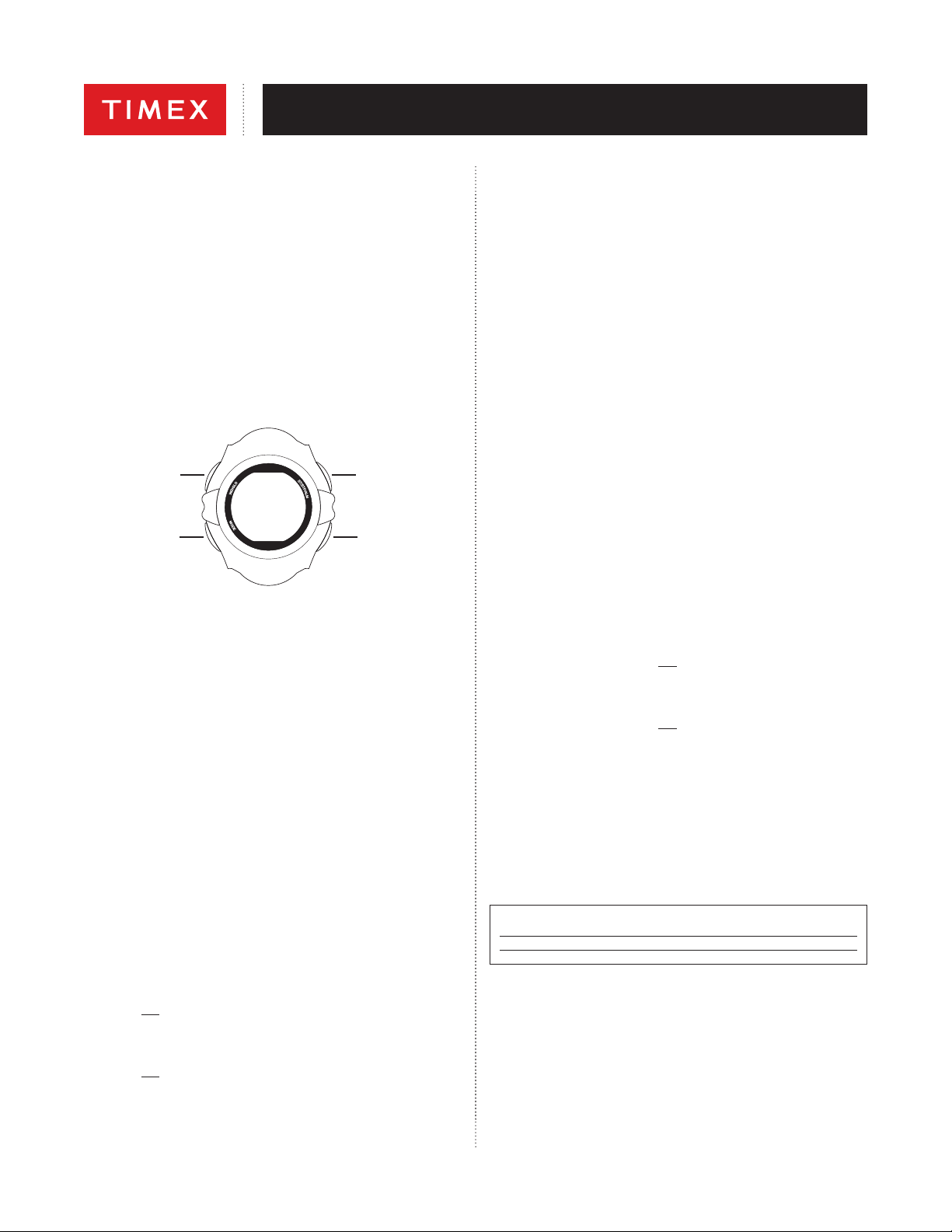
MODE
RESET/NEXT
(NEXT STEP)
INDIGLO
®
BUTTON
ST/STP/ALM
(INCREASE VALUE)
Button functions shown with setting functions in parentheses
TIME
To set time and date.
1. Press MODE until you get to the screen where the Seconds can be seen
ashing.
2. Press ST/STP/ALM to set Seconds to zero.
3. Press RESET/NEXT to set Minutes, as indicated by its ashing. Press
ST/STP/ALM to advance the Minutes setting. Press and hold to increment
quickly.
4. Press RESET/NEXT to set Hours, as indicated by its ashing. Press
ST/STP/ALM to advance the Hours setting. Press and hold to increment
quickly.
Note: As the Hours are incremented, the time indicator changes from
“A” (AM), to “P” (PM) to “H” (24-hour time).
5. Press RESET/NEXT to set the Day, as indicated by its ashing. Press
ST/STP/ALM to advance the Day setting. Press and hold to increment
quickly.
6. Press RESET/NEXT to set the Month number, as indicated by its ashing.
Press ST/STP/ALM to advance the Month setting. Press and hold to
increment quickly.
7. Press RESET/NEXT to set Day of the Week, as indicated by its ashing.
Press ST/STP/ALM to advance the Day of the Week setting. Press and
hold to increment quickly.
8. Press MODE to exit Time Set.
Notes:
A. To peek at the Date setting, press ST/STP/ALM.
B. To peek at the Daily Alarm setting, press RESET/NEXT.
C. To turn on/off the Daily Alarm:
1. Press and hold RESET/NEXT.
2. Press ST/STP/ALM repeatedly to turn on/o the Alarm. The Alarm symbol
b indicates that the alarm is on.
D. To turn on/o the Hourly Chime:
1. Press and hold RESET/NEXT.
2. Press MODE repeatedly to turn on/o the Hourly Chime. The Days of the
Week symbols all light to indicate that the hourly chime is on.
STOPWATCH
Use this function for timing events.
1. Press MODE until three of the Days of the Week symbols are ashing.
2. Press ST/STP/ALM to start timing.
3. With the stopwatch running, press RESET/NEXT to record a Split time.
The stopwatch will continue timing in the background.
4. Press RESET/NEXT to release the display and show the current running
stopwatch time.
5. Press RESET/NEXT to record another Split time.
6. Press ST/STP/ALM to pause the timing.
7. Either press ST/STP/ALM to resume timing, or press RESET/NEXT to
reset the Stopwatch to zero.
Note: If the Stopwatch was paused when the display was showing a Split
time, the rst press of RESET/NEXT will show the nal recorded time, and
the second press will reset the Stopwatch to zero.
ALARM
To set a Daily Alarm with a ve-minute snooze feature.
1. Press MODE until the Hours digit ashes.
2. Press ST/STP/ALM to advance the Hours setting. Press and hold to
increment quickly.
Note: The Hours will be presented in the same format (12- or 24-hour time)
as the time setting.
3. Press RESET/NEXT to set the Minutes as indicated by its ashing. Press
ST/STP/ALM to advance the Minutes setting. Press and hold to increment
quickly.
Note: The Alarm symbol b indicates that the alarm is on.
4. Press MODE to exit Alarm Set and return to Time of Day.
5. When the alarm sounds:
• Press RESET/NEXT to stop the alert, and the alarm will sound at the same
time on the next day, or
• Press ST/STP/ALM to stop the alert and postpone the alarm for
5 minutes.
To turn on/off the Daily Alarm:
1. From Time of Day mode, press and hold RESET/NEXT.
2. Press ST/STP/ALM repeatedly to turn on/off the Alarm. The Alarm symbol
b indicates that the alarm is on.
To turn on/off the Hourly Chime:
1. From Time of Day mode, press and hold RESET/NEXT.
2. Press MODE repeatedly to turn on/off the Hourly Chime. The Days of the
Week symbols light to indicate that the hourly chime is on.
To peek at the Daily Alarm setting, From Time of Day mode, press
RESET/NEXT.
INDIGLO
®
NIGHT-LIGHT
Press INDIGLO
®
button to illuminate watch display for 2-3 seconds.
Electroluminescent technology used in the INDIGLO
®
night-light illuminates
watch face at night and in low light conditions.
WATER AND SHOCK RESISTANCE
If your watch is water-resistant, meter marking or (O) is indicated
Water-Resistance Depth p.s.i.a. * Water Pressure Below Surface
30m/98ft 60
50m/164ft 86
100m/328ft 160
*pounds per square inch absolute
WARNING: TO MAINTAIN WATER-RESISTANCE, DO NOT PRESS ANY
BUTTONS UNDER WATER.
1. Watch is water-resistant only as long as lens, push buttons and case
remain intact.
2. Watch is not a diver watch and should not be used for diving.
3. Rinse watch with fresh water after exposure to salt water.
4. Shock-resistance will be indicated on watch face or caseback. Watches
are designed to pass ISO test for shock-resistance. However, care should
be taken to avoid damaging crystal/lens.

Loading…
常见问题
请给产品评分,告知您对Timex TW5M32800 Marathon 手表看法。您是否希望分享对该产品的体验或提出问题?请在页面底部留言。有关本说明书的更多信息
我们知道,为您的 Timex TW5M32800 Marathon 手表 提供纸质手册是件好事。 您随时可以从我们的网站下载该手册并自行打印。 如果您想要原始手册,我们建议您联系Timex。 他们也许能够提供原始手册。 您是否正在寻找其他语言版本的 Timex TW5M32800 Marathon 手表 手册? 在我们的主页上选择您的首选语言并搜索型号以查看我们是否有可用。
规格
| 品牌 | Timex |
| 模型 | TW5M32800 Marathon |
| 类别 | 手表 |
| 文件类型 | |
| 文件大小 | 1.59 MB |
关于 Timex TW5M32800 Marathon 手表 的常见问题
我们的支持团队将搜索有用的产品信息并回答常见问题。如果您在常见问题中发现不准确的回答,请使用联系表格告知我们。
设备中的电池被氧化了,我仍可以安全使用吗? 验证
Ja,该设备仍然可以安全使用。首先,取出氧化电池。切勿徒手操作。然后用蘸有醋或柠檬汁的棉签清洁电池盒。晾干并插入新电池。
有帮助 (931) 阅读更多
加入有关该产品的对话
您可以在这里分享您对 Timex TW5M32800 Marathon 手表 的看法。 如果您有疑问,请先仔细阅读手册。 可以使用我们的联系表索取手册。
回复 | 有帮助 (0) (谷歌翻译)